
Introducing HitPath Direct Linking: Affiliate Tracking Without Redirects
By the HitPath Team
HitPath Direct Linking (CDL) brings affiliate tracking without redirects: affiliates send traffic straight to the brand's landing page, and HitPath still tracks the affiliate, campaign, subIDs and sale.
Standard tracking links still work and still power most HitPath traffic. But browsers now treat redirect hops with suspicion, and ad platforms want the URL in the ad to be the page the user lands on. Direct Linking gives brands and media buyers a clean option for those channels.
How Direct Linking Works
One script on two pages handles the click and the sale.
- The affiliate sends the visitor to the brand's landing page with tracking parameters in the URL.
- The cdl.js script tracks the click and sets a first-party cookie on the brand's domain.
- On the order confirmation page, the script finds the cookie and tracks a new sale.
Campaign status, approvals, caps, user-agent checks and strict IP checks are all still enforced. Refreshing the confirmation page is tracked as a duplicate, not a second sale.
| Purpose | Parameter | Alternative | If both are present |
|---|---|---|---|
| Affiliate | pub | utm_source | pub wins |
| Campaign | sid | utm_campaign | sid wins |
| SubIDs | c1, c2, c3 | none | Passed through and tracked |
Why Redirect-Free Affiliate Tracking Matters Now
Browsers and ad platforms are both moving away from tracking redirects.
- Safari has blocked third-party cookies by default since March 2020, and its tracking prevention detects domains used for redirect ("bounce") tracking. (WebKit)
- Firefox clears cookies from redirect tracking sites every 24 hours under Enhanced Tracking Protection. (Mozilla)
- Google Ads disapproves ads whose final URL redirects to a different domain. (Google)
- Meta requires what an ad promotes to match its landing page. (Meta)
Benefits of Direct Linking for Brands and Affiliates
For brands and advertisers
- Ads point to your real pages, and the tracking cookie lives on your own domain.
- Affiliates can run your offers on paid social and search without tracking-domain URLs.
- Your campaign rules (status, approvals, caps, IP and user-agent checks) still apply.
- Refreshes are caught as duplicates, and order ID and sale amount can be tracked with each sale.
For affiliates and media buyers
- Paste the brand's real landing page into Ads Manager.
- Pass your campaign, ad set and ad IDs into c1, c2 and c3 and see them in HitPath.
- Set pub and sid explicitly so UTMs added elsewhere never overwrite attribution.
For the industry, attribution data created on the brand's own domain, through a transparent traffic path, is where tracking is heading as browsers tighten privacy.
Why HitPath
HitPath has built tracking for performance marketers since 2005, and technology is its only business. (About HitPath)
- Built by operators. HitPath started as an in-house tracking engine used while running advertiser campaigns, then was licensed to others. (OPTIZMO interview)
- A complete toolset. Fraud control, suppression management, vanity tracking domains, multi-level real-time reporting, and publisher discovery with CrossPub®. (HitPath for Networks)
- Integrations. Anura for click and sales fraud evaluation, and Tipalti for affiliate payments. (Anura integration)
- Constant releases. 2026 alone brought Anura fraud evaluation, RPM Links, affiliate portal EPC and conversion rate, and now Direct Linking.
- People behind it. HitPath's Managed Services team can enable CDL, place the scripts and test the flow for you.
How to Set Up Direct Linking in HitPath
Setup takes one script on the landing page and one on the confirmation page. In the code below, replace yourtrackingdomain.com with the tracking domain shown in your campaign's Direct Linking (CDL) tab.
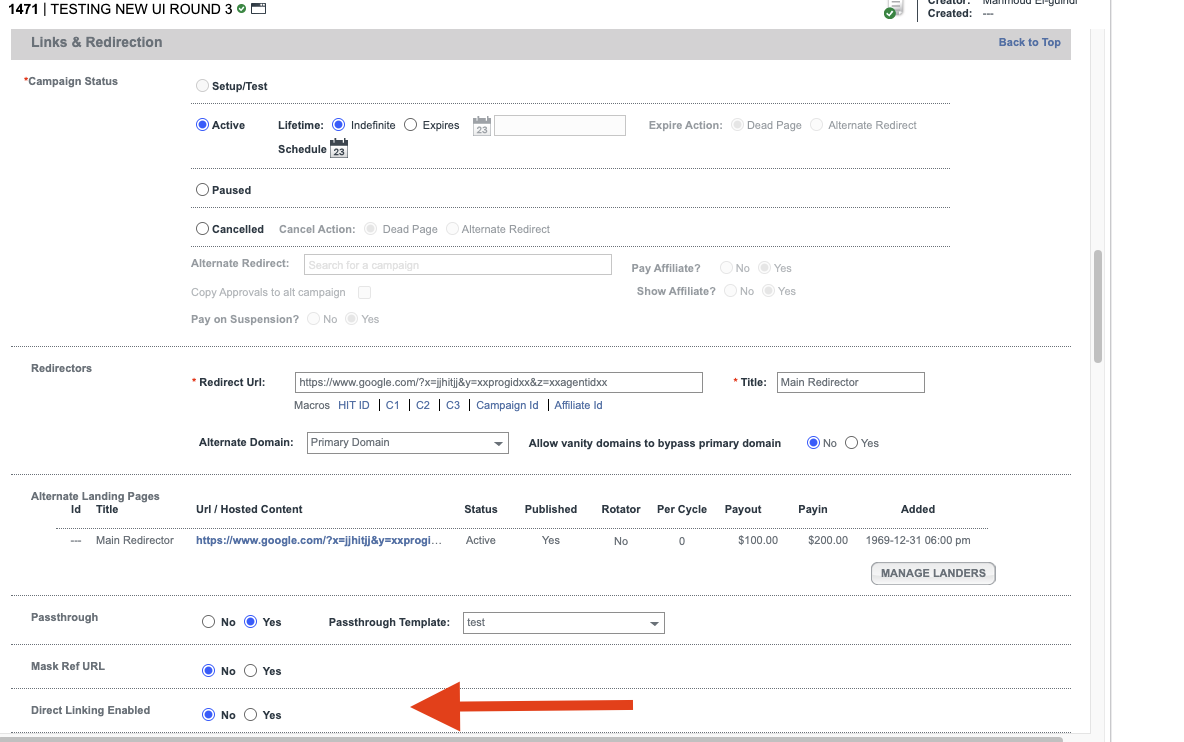
Step 1: Turn on Direct Linking. Open the campaign in HitPath, go to the Links & Redirection section, set Direct Linking Enabled to Yes, and save the campaign.
Step 2: Copy your script. Open Campaign Actions and click the Direct Linking (CDL) tab, next to the Pixel tab. It shows the script for your campaign, with your tracking domain already filled in.
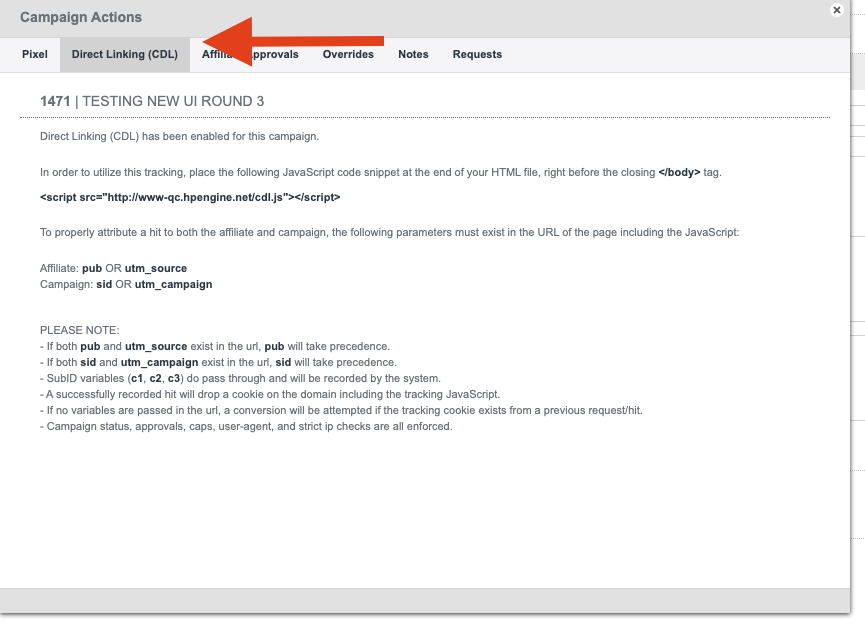
Step 3: Add the script to your landing page, right before the closing </body> tag:
<script src="https://yourtrackingdomain.com/cdl.js"></script>Only add it to the landing page and confirmation page. On a page with no tracking parameters, the script attempts to track a sale if the cookie exists.
Step 4: Share the Direct Link with affiliates:
https://www.yourbrand.com/landing-page?pub=AFFILIATE_ID&sid=CAMPAIGN_ID&c1=SUBID1Step 5: Track the sale on the confirmation page. Use one option, never both, or the sale may be tracked twice.
Option A: basic. Add the same cdl.js script before </body>.
Option B: with order ID and sale amount. Use this snippet instead of cdl.js. It reads the click ID (the Hit ID in HitPath) from the cookie and sends the order ID (transid) and sale amount (ate) to HitPath. Replace ORDER_ID and ORDER_TOTAL with your platform's order values.
<script>
  (function () {
    var match = document.cookie.match(/(?:^|;\s*)CDL=([^;]+)/);
    if (!match) return;
    var cdl;
    try { cdl = JSON.parse(decodeURIComponent(match[1])); } catch (e) { return; }
    if (!cdl.hid) return;
    new Image().src = 'https://yourtrackingdomain.com/pixel.php'
      + '?hid=' + encodeURIComponent(cdl.hid)
      + '&sid=' + encodeURIComponent(cdl.utm_campaign)
      + '&transid=' + encodeURIComponent('ORDER_ID')
      + '&ate=' + encodeURIComponent('ORDER_TOTAL');
  })();
</script>
Step 6: Keep URLs intact. No redirect or plugin should strip parameters from the landing page URL, and the confirmation page URL must not contain pub, sid, utm_source or utm_campaign, or the visit counts as a new click.
Example: Direct Linking with Meta Ads
A media buyer promotes a brand's offer on Facebook and Instagram through a HitPath campaign.
- In Meta Ads Manager, set the ad's Website URL to the brand's landing page, for example https://www.yourbrand.com/landing-page.
- In the URL parameters field, enter:
pub=AFFILIATE_ID&sid=CAMPAIGN_ID&c1={{campaign.id}}&c2={{adset.id}}&c3={{ad.id}}Meta fills in the campaign, ad set and ad IDs on each click, and HitPath tracks them as c1, c2 and c3. The ad points at the brand's real page, and the buyer can optimize down to the ad level.
How to Test Direct Linking, and When to Use Standard Tracking
Run one test in a private browser window before any paid traffic goes live.
- Open the landing page with test values: ?pub=TEST_AFF&sid=CAMPAIGN_ID&c1=test
- Confirm a cookie named CDL appears on your domain (browser developer tools)
- Confirm the click shows in HitPath with the right affiliate, campaign and subID
- Complete a test order and confirm the sale is attributed to that click
- Refresh the confirmation page and confirm it shows as a duplicate
Direct Linking requires the landing page and confirmation page to be on the same domain, and a confirmation page that allows custom JavaScript. If your setup doesn't meet both, keep using HitPath's standard tracking for that campaign.
Direct Linking FAQ
What is direct linking in affiliate marketing? Direct linking sends affiliate traffic straight to the advertiser's own page, and a script on that page tracks the click instead of a redirect.
Does Direct Linking replace standard tracking? No. It's an extra option you enable per campaign. Standard tracking stays available.
Can I use UTMs instead of pub and sid? Yes. If both are present, pub and sid win, which is why we recommend them for paid media.
Why isn't the order ID tracked when I add transid to the confirmation URL? The cdl.js script doesn't read it from the URL. Use Option B in Step 5.
Can HitPath set this up for me? Yes. HitPath's Managed Services team can enable CDL, place the scripts and test the flow.
Get Started
Direct Linking is available in HitPath now. Turn it on under Links & Redirection, copy the script from Campaign Actions > Direct Linking (CDL), and follow the steps above. If you don't see the Direct Linking option in your campaign settings, contact HitPath to have it enabled for you.